Syntek – AI Innovation Google Slides
Modern Presentation Design for AI Concepts and Tech Strategies
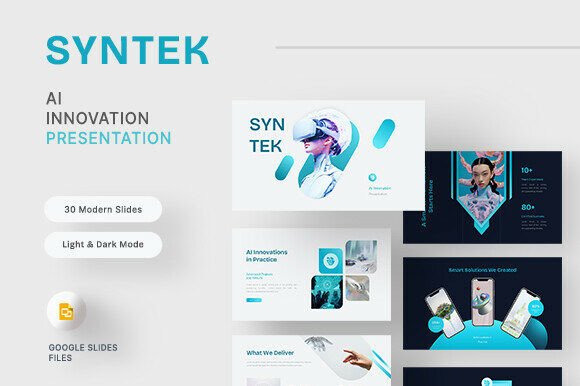
If you're looking to present artificial intelligence ideas, product features, or research findings in a clear and visually appealing way, Syntek – AI Innovation Google Slides offers a streamlined solution. This presentation template is built with clean gradients, futuristic visuals, and 30 fully editable slides that help simplify complex topics for audiences of all levels.
What Makes Syntek Unique?
Syntek stands out due to its modern aesthetic and practical structure. Whether you're pitching a new AI product or explaining machine learning concepts, the template provides a professional canvas that supports both light and dark mode viewing. Each slide is based on master layouts, making it easy to maintain consistency across your presentation while customizing visuals and text to fit your specific message.
Who Can Benefit from This Template?
This presentation design is especially useful for:
- AI startups needing to pitch ideas clearly
- SaaS companies showcasing new features or updates
- Research labs presenting findings to stakeholders
- Digital product teams demonstrating prototypes
- Educators teaching AI-related topics
Whether you're a beginner or an experienced professional, Syntek helps you communicate your message with visual clarity and modern design.
Key Features and Their Practical Benefits
The template includes a variety of slide types that support different storytelling needs:
- Welcome Slides – Set the tone and introduce your topic
- About Us / Our Teams – Share your background or team members
- Our Service / Portfolio – Highlight your offerings or past work
- Infographics and Charts – Present data in an easy-to-understand format
- Mockup Devices – Showcase digital products in real-world contexts
- Support and Ending Slides – Close your presentation with contact info or next steps
Each slide is fully editable, allowing you to change colors, fonts, and layout elements without needing advanced design skills.
Using Syntek Across Different Contexts
One of the biggest advantages of Syntek is its versatility. Here are a few realistic ways you might use it:
- Startup Pitch Decks – Present your AI-based business idea to investors using a clean, modern format that emphasizes clarity and professionalism.
- Product Demos – Use mockup devices and feature slides to visually explain how your digital product works.
- Academic Presentations – Educators and students can use the template to explain complex AI topics with charts, infographics, and structured layouts.
- Internal Team Updates – Share research insights or strategy updates with team members using a consistent, visually engaging format.
- Marketing Presentations – Showcase your SaaS platform or AI tool to potential clients using a design that reflects modern tech aesthetics.
Getting Started with Syntek
When you download the Syntek template, you'll receive a Google Slides .PPTX file along with a documentation guide. The guide includes helpful instructions on how to edit slides, change fonts, and replace placeholder images. All fonts used are free and easy to install, ensuring your presentation looks the same across different devices.
It’s important to note that while the preview images are for demonstration purposes only, you can easily replace them with your own visuals or stock photos. Since all elements are editable, you can tailor the template to match your brand colors, logo, and messaging style.
Design Considerations and Customization Tips
If you're new to presentation design, here are a few tips to help you make the most of Syntek:
- Stick to the Master Slides – Using the master layout ensures your design stays consistent and professional throughout.
- Customize for Branding – Replace default colors and fonts with your brand’s palette to create a personalized look.
- Use Visual Hierarchy – Make sure your most important points stand out by using bold headings, contrasting colors, and clear layout spacing.
- Keep Slides Simple – Avoid overcrowding slides with too much text. Use bullet points and visuals to convey your message clearly.
Why Choose Syntek Over Other Presentation Templates?
Many presentation templates focus on flashy animations or overly complex designs. Syntek takes a different approach by emphasizing clean visuals and functional layouts. This makes it ideal for professionals who want to focus on content rather than distractions. The ability to switch between light and dark modes also adds flexibility, letting you choose the best display setting based on your environment or audience preferences.
Final Thoughts
Syntek – AI Innovation Google Slides is more than just a design template—it’s a tool that helps you communicate complex ideas with clarity and style. Whether you're presenting to investors, clients, or colleagues, this template gives you the structure and flexibility to deliver your message effectively. With 30 well-designed slides, easy customization, and a modern aesthetic, Syntek supports a wide range of uses in both professional and educational settings.